NU Degree 1st Year Result 2026 – National University
Waiting for your exam scores is a stressful experience. You might feel anxious or excited today. These feelings are completely normal. You worked hard for months. You studied late at night. You gave your best in the exam hall. Now, the wait is finally over! The National University (NU) of Bangladesh published the Degree 1st Year Result today, February 28, 2026.
This complete guide is for all Bangladeshi students. It helps you find the NU Degree 1st Year Result 2026. We wrote this article in very simple English. Everyone can understand it easily. It does not matter where you live. It does not matter if you are good with computers. You will learn how to check your result quickly. You will also learn how to get it by SMS. We will show you how to download your full mark sheet. We even explain the re-scrutiny board challenge. This is for students who want to recheck their marks. Let us look at the official facts now. Follow our simple, step-by-step instructions below.
NU Degree 1st Year Result 2026
The National University of Bangladesh is very large. It has one of the biggest student bodies in the country. The university processes results for hundreds of thousands of students. This takes a lot of care and time. Today, the Office of the Controller of Examinations released the NU Degree 1st Year Result 2026. This is for all students from the 2024 Degree (Pass) and Certificate Course 1st Year exams.
The university published the results today, February 28, 2026. They became available to the public at exactly 4:00 PM. This year, students did very well. The university announced a high average pass rate of 90.29%. This great pass rate shows the hard work of students all over the country.
Here is the official data for the Exam Year 2024. The university published this data today in 2026:
| Information Category | Official Details |
| University Name | National University, Bangladesh |
| Course Name | Degree (Pass) and Certificate Course 1st Year |
| Exam Year | 2024 |
| Result Publication Date | 28/02/2026 |
| Result Publication Time | 4:00 PM |
| Total Candidates | 224,662 students (Regular, Irregular, and Improvement) |
| Total Colleges | 1,921 Affiliated Colleges |
| Total Centers | 649 Exam Centers across the country |
| Average Pass Rate | 90.29% |
| Controller of Examinations | Md. Enamul Karim |
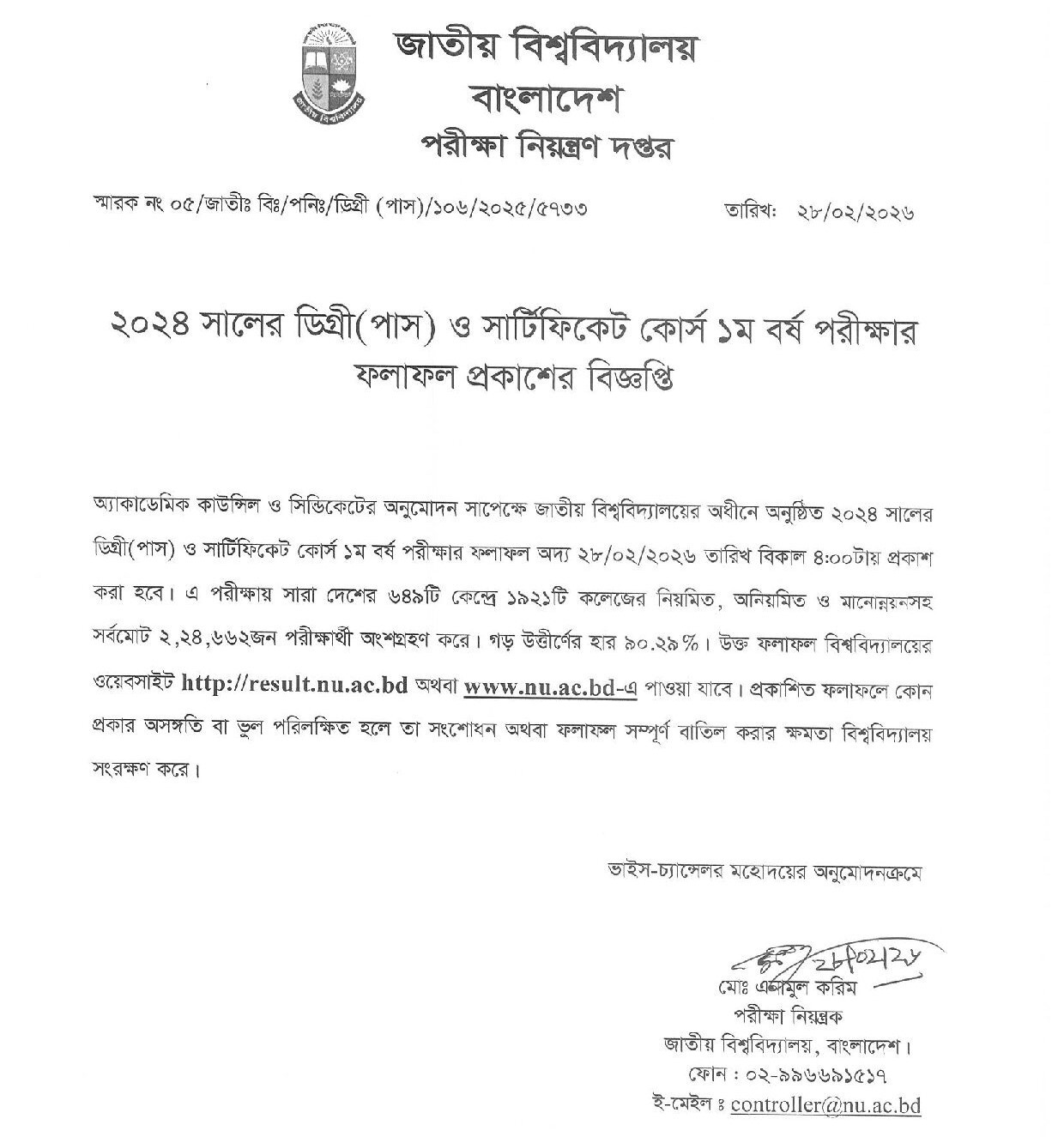
Note: The university authority can correct mistakes in the published results. They also have the right to cancel the result entirely if needed.
How to check Degree 1st Year Result?
Checking your result online is the most popular way. It gives you the most information. However, over 200,000 (two lakh) students might try to check at the same time. The server can become very slow. Sometimes the website stops working. Do not panic if the website takes time to load. This is very normal on result days.
The official notice says the results are on two websites. You can visit http://result.nu.ac.bd or www.nu.ac.bd. Here is the step-by-step online method to check your Degree 1st Year Result:
- Open your web browser: Use Google Chrome, Mozilla Firefox, or Safari. You can use your mobile phone, tablet, or computer. Make sure your internet connection is stable.
- Visit the official website: Go to the National University result portal. Type http://result.nu.ac.bd or www.nu.ac.bd in the top address bar. Press Enter.
- Select your exam type: Look at the main homepage. You will see different NU courses. Click the “+” icon next to “Degree”. Then, select the exam name as Degree 1st Year.
- Enter your Roll Number: Type your exact exam roll number in the box. Check for any typing mistakes.
- Enter your Registration Number: Type your correct 11-digit National University registration number. This number is unique to you. It is on your admit card. It is also on your registration card.
- Enter the Exam Year: Type 2024 in the Exam Year box. You must enter 2024. This is your academic exam year. The results are coming out today in 2026, but the exam year remains 2024.
- Submit the information: Click the “Search Result” button.
Your result will appear on the screen. It will show your passing status and grades. We strongly suggest you take a screenshot on your phone. You can also print the page. Keep this record safe. You might need it later.
Degree 1st Year Result by SMS
Sometimes the official website is down. This happens because of heavy internet traffic. Maybe you live in a rural area. Maybe your internet is slow. The SMS method is a great backup. It is quick and works completely offline. It is very reliable. You can use any mobile operator in Bangladesh. You can use Teletalk, Grameenphone, Banglalink, Robi, or Airtel. Get your result delivered right to your message inbox.
Here is the simple step-by-step SMS method:
- Open the Message app on your mobile phone.
- Tap “Create New Message” or “Write Message.”
- Type this exact format: NU <space> DEG <space> Your Roll Number
- Send this message to the number 16222.
A Clear Example for You:
Suppose your Degree 1st Year Exam Roll Number is 1234567. Your text message will look exactly like this:
NU DEG 1234567
Important Notes and Tips for the SMS Method:
- Spacing is important: Make sure you leave one blank space between “NU”, “DEG”, and your roll number. Do not use commas, full stops, or special characters.
- Account Balance: The SMS costs money. It usually costs 2.50 BDT to 3.00 BDT plus taxes. This money comes from your main mobile balance. Make sure you have enough money in your phone. Otherwise, the message will fail.
- Patience is key: Many students send SMS at the same time today. The mobile network can get very busy. If you do not get a reply right away, wait. Do not panic. Wait 10 to 15 minutes. Then try again to avoid multiple charges.
Degree 1st Year Marksheet
Passing the exam is a great feeling. Knowing your exact marks is even better. You want to see your letter grades for each specific subject. The National University lets you download a full mark sheet. This detailed mark sheet shows your subject grades. It also shows your final Grade Point Average (GPA).
Here is how to check your Degree 1st Year Result with a full mark sheet online:
- Go to the result portal: Open your web browser. Go to http://result.nu.ac.bd.
- Navigate to the Degree section: Look at the main menu. Click the Degree tab to open it.
- Select your academic year: A menu will drop down. Click directly on “First Year”.
- Fill in your details: Enter your exact Roll Number. Enter your 11-digit Registration Number. You absolutely need both numbers for a full mark sheet.
- Enter the Exam Year: Type 2024 in the box.
- Solve the Security Captcha Code: You will see a small picture. It has random letters and numbers. This is a Captcha. Type these exact letters and numbers in the empty box below it. This proves you are a real student. It blocks computer bots from crashing the server.
- Get your mark sheet: Click the “Search Result” button.
Your full mark sheet will now appear on your screen. It shows every subject. This digital document is very important for your academic future. Download it as a PDF file. You can also print it right away. You will need it for the future. You need it for scholarships. You also need it if you apply for a re-scrutiny challenge.
Re-scrutiny Application
Sometimes, your official result does not show your hard work. You might look at your mark sheet and feel sad. Your grades might be lower than expected. Maybe you failed a subject you did well in. Please do not lose hope. The National University gives everyone a fair chance. You can challenge your result. This official process is called “Re-scrutiny” or “Board Challenge.”
What exactly is Re-scrutiny?
Re-scrutiny is a formal request. You ask the university to find your original exam paper. Then, they re-check it. They check for counting mistakes. They make sure the examiner marked every single answer.
Application Date and Deadline:
The NU authority gives a separate notice for re-scrutiny. This notice usually comes within a week of the main result. The result came out today, February 28, 2026. So, expect the notice very soon. Students usually get 15 to 20 days to apply online. They must also pay the fee within this time. Always check the official NU notice board (www.nu.ac.bd). Do not miss this important deadline.
Procedure in Detail:
- Visit the official NU portal: Go to www.nu.ac.bd. Find the Services > Student Login area. Or, go to the Sonali Seba payment portal.
- Select the Application type: Look for the form named “Rescrutiny / Board Challenge / Khata Challenge”. Choose “Degree 1st Year” from the list.
- Enter your details: Type your 11-digit Registration Number. The system will automatically find your profile. It will show all your 2024 exam subjects.
- Select subjects carefully: Click the boxes next to the subjects you want to challenge. Choose wisely. You must pay a non-refundable fee for every single subject you select.
- Generate the Pay Slip: Submit the online form. The website will automatically create a PDF paper. This is the “Sonali Seba Pay Slip.” Download this slip and print it.
- Pay the application fee: Take the printed Pay Slip to any Sonali Bank branch in Bangladesh. Deposit the cash fee there. You can also pay digitally. Use mobile services like bKash, Nagad, or Rocket. You can do this securely through the online payment gateway.
- Keep your receipt safe: After payment, your application is complete. It is now registered in the NU database. Keep the bank receipt safe. Save your digital payment SMS. You will definitely need it later.
Degree 1st Year Re-scrutiny Result
Waiting for the re-scrutiny result takes patience. It usually takes 30 to 45 days. This waiting time starts after the application deadline officially ends. The university needs this time. Examiners must physically find your exam paper in the large archive. Then, they carefully count the marks again.
Procedure to Check the Degree 1st Year Rescrutiny Result:
- The NU authority will publish an official notice about the final result. Go back to the result portal at http://result.nu.ac.bd.
- Follow the exact same steps as before. Select Degree. Then click on First Year.
- Enter your Roll Number. Enter your Registration Number. Enter the Exam Year (2024).
- Type the security Captcha code. Click the “Search Result” button.
- Understanding the outcome: Sometimes your marks increase. If so, your new GPA and grade will automatically appear on the screen. If there is no mistake found in your paper, your result will simply stay the same.
- Alternative Method: Sometimes NU uploads a large PDF list. They put it on the main notice board. This list only shows the registration numbers of changed results. Download this PDF. Use the “Find” tool (Ctrl+F) to search for your registration number.
FAQ
Here are common questions from students on Google. We updated the answers with today’s official information:
The National University published the Degree 1st Year Result (Exam Year 2024) today. The exact date is February 28, 2026. The publication time was 4:00 PM.
This year had a very high average pass rate. It was 90.29%. Exactly 224,662 candidates took the exams.
Yes, you can. You only need your Roll Number for the mobile SMS method. However, you need more details for the online mark sheet. You must have both your Roll Number and Registration Number to download the full, detailed mark sheet.
This happens because of high server traffic. Everyone is checking their result right now. Sometimes, it is just a simple typing mistake. First, check your typed numbers. Ensure your Roll, Registration, and Exam Year (2024) are perfectly correct. If they are correct, please wait. Wait 30 to 60 minutes. Then try again later when the server is less busy.
Please do not worry. Do not feel discouraged. National University academic rules are helpful. You can be promoted to the 2nd year even if you fail up to three subjects. This is called being “Promoted with Condition.” You just have to retake the exams for those failed subjects. You will take them as an “Irregular” or “Improvement” student next year.
The fee changes sometimes. It depends on updated university rules. Usually, it costs around 500 BDT to 800 BDT for each subject. You will see the exact, updated fee on your generated Sonali Seba pay slip.
Conclusion
Checking your NU Degree 1st Year Result 2026 is not hard. It does not have to be stressful. You can check it online at http://result.nu.ac.bd. This gives you a full, detailed mark sheet. Or, you can use the fast offline SMS method. You now have all the tools. You know the exact steps to follow right now.
Remember, exams are just one part of your life journey. Did you get your desired result? Are you in the 90.29% who passed? Huge congratulations to you! Celebrate your success today. But what if things did not go well? Take a deep breath. Education is about learning and growing. You have great backup options. You can use the re-scrutiny board challenge. You can take improvement exams. You will get right back on track. Keep working hard and focus on your bright future.